
A good RV backup camera turns the worst moment of towing (backing blind into a tight campsite with someone waving their arms behind you) into something you can watch happen instead of guessing. The camera your truck came with stops helping once you hitch the trailer, because all it sees is the coupler. This guide covers which type holds up on the road, why a camera on a pre-wired trailer can sit dark on a sunny afternoon, what installing one involves, and what to check when the picture drops out.
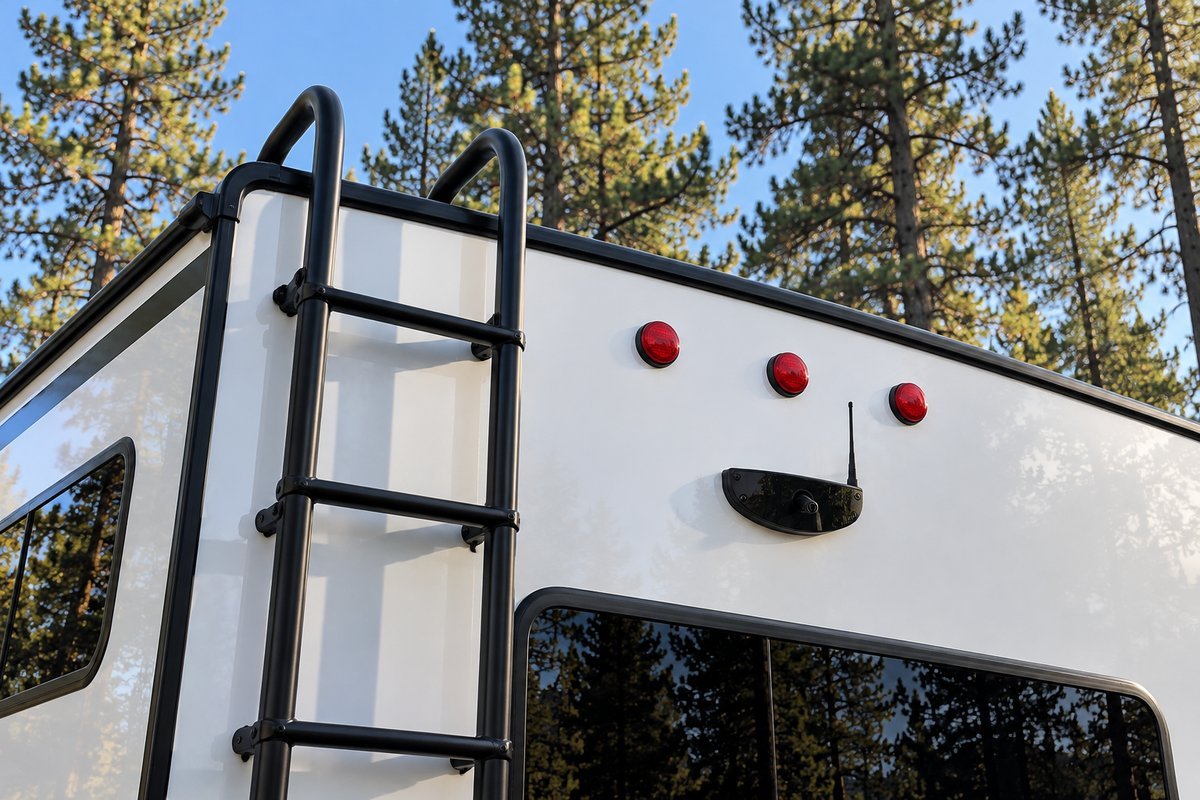
Quick answer. For most travel trailers, a wireless system is the practical choice, because a wired camera's cable has to cross the hitch every time you hook up. If your trailer is pre-wired for Furrion, its camera mount usually draws power from the marker lights, so the camera stays off until you turn on the truck's headlights. The four picks below cover a wired kit, a two-camera wireless kit, a rear-and-side wireless kit, and an add-on pair for owners who already run a Furrion system.
Table of Contents
Should You Buy a Wired or Wireless RV Backup Camera?
Every RV backup camera falls into one of two camps, and that choice shapes everything that follows, so it comes before any specific product.
A wired system runs an actual video cable from the camera at the back of the RV to the monitor on the dash. No radio signal means no cell tower or neighbor's Wi-Fi to interfere. The tradeoff shows up at install time. The Yakry wired kit below ships with a 66-foot cable, and routing that from the dash to the back of a travel trailer, usually under the belly or through cabinet runs, is a real afternoon's work. On a towable, that cable also has to come apart at the hitch every time you unhook.
A wireless system sends video over a radio link instead, so there's no cable to run from one end of the RV to the other. The camera still needs 12 volt power at the back, and the monitor plugs into the truck. The cost is that the signal has to share the air. Most of these kits run on the 2.4 GHz band, the same band many Wi-Fi networks use, and a crowded campground full of hotspots is a busier radio environment than an empty highway.
There's also a difference inside wireless. A digital system like the ones below runs its own dedicated link between camera and monitor. A Wi-Fi camera that streams to an app on your phone works differently, and Lippert's own Furrion camera page notes that this kind of camera can have up to one second of lag between what the lens sees and what the screen shows. In a campground at walking pace, you won't notice. In a lane change at highway speed, a picture that's a second old is showing you a gap that may already be gone.
For a trailer that gets hitched and unhitched every trip, wireless is the right call for most owners. The case for wired is an RV where the picture has to be right every single time, and you're willing to run the cable to get it.
What Should You Look for Before You Buy an RV Backup Camera?
Four things matter more than the rest of the spec sheet put together.
Field of view. The rear cameras below run from 105 to 150 degrees. Wider shows more of the lane behind you, but it also bends the edges of the picture, which makes distance harder to judge. A side camera does a different job and can be much narrower. Furrion's side cameras are 65 degrees, because they only need to watch the lane beside you.
Range, and which range. Box figures are almost always measured in open space with nothing in the way. Furrion is unusually plain about the gap, rating its Vision S+ system at up to 100 feet at high speed and up to 492 feet in open space. On the road, the signal has to get past the trailer body and into the cab, so plan on the smaller number.
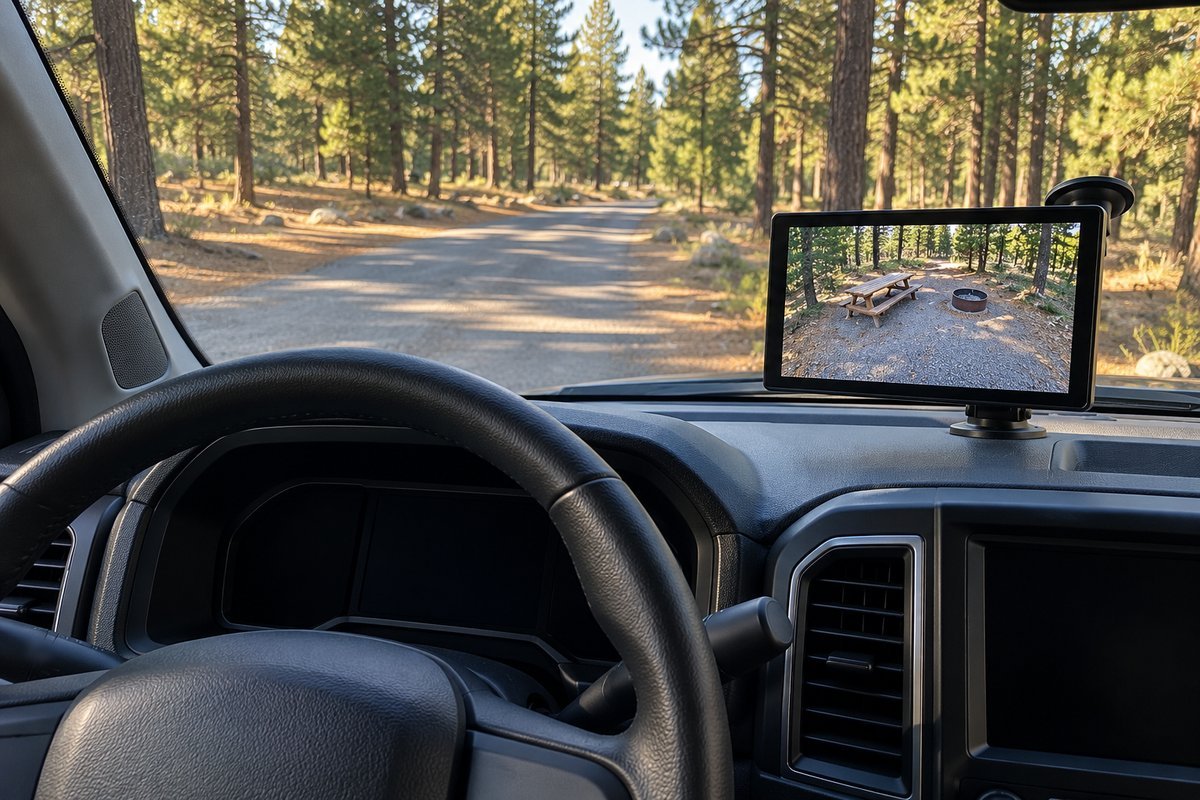
Monitor size and mount. A 7-inch screen is easier to read at a glance from across a wide dash, which matters when you're also watching traffic and both mirrors. Mount it low so it doesn't block your view through the windshield.
Power at the back of the trailer. This is the one people most often miss. On most trailers that come pre-wired for a camera, the mount gets its power from the marker light circuit, the small lights along the top and sides of the trailer. Those only come on when the truck sends power down the running light wire, which it does when its parking lights or headlights are on. With the headlight switch on Auto in daylight, the trailer's marker lights stay off, and so does the camera. Turn the switch to On before you pull out.
Some newer trucks add one more problem. Furrion's own listing for its 7-way adapter says the power management on some late-model trucks and SUVs restricts the 12 volt supply its cameras need through the 7-way connector, and it sells a plug-in adapter (F2BC004XXBK) to get around it. If a Furrion camera flickers or drops out even with the lights on, that adapter is the part to look at before you blame the camera.
Which RV Backup Camera Systems Are Worth Your Money?
These aren't ranked best to worst. Each one fits a different RV and a different kind of owner. The specs on each card come from the product's own Amazon listing, checked before this guide was published.
Yakry Y14 Wired RV Backup Camera (7" Monitor)
Best for zero interferenceThis is the one to buy if a wireless system has already dropped out on you at the worst possible moment. A real cable runs from the 7 inch monitor to the camera, so there's no radio signal for a crowded campground to compete with. The camera and monitor run off one power supply, and the monitor has a second video input if you want to add another camera later.
The tradeoff is the cable itself. Yakry includes 66 feet of it, and routing that from the dash to the back of a trailer is more work than any wireless option here. Yakry's listing quotes an install of about 8 minutes, which is a fair number for the wiring at each end, not for the afternoon spent running cable the length of the RV.
What You'll Love
- No wireless signal to drop out
- Second video input for a later camera
- Infrared night vision
- Anti-glare sunshade on the monitor
Worth Considering
- 66 feet of cable to route through the RV
- The cable has to disconnect at the hitch on a towable
- 150 degrees bends the edges more than a narrower lens
- No recording
Yakry Y28 Wireless 2 Camera RV Backup Camera System
Best all-around wireless pickThis is the place to start for most owners buying a first wireless RV backup camera. It comes with two cameras and a 7 inch monitor with dual antennas, and the monitor takes up to four cameras if you add side views later. It also records, so a scrape in a parking lot has footage behind it.
Yakry gives two range figures: 320 feet on vehicles and up to 830 feet in open areas. The first is the one to plan around, and it's still well beyond the length of any travel trailer. The listing describes it as plug and play on pre-wired trailers, so on an RV with a factory camera mount it uses what's already there.
What You'll Love
- Two cameras in the box
- Expands to four cameras on one monitor
- Built-in recording
- Separate range figure for driving, not just open space
Worth Considering
- Still a radio signal, so interference is possible
- Camera power on a pre-wired trailer usually means marker lights on
- More to set up than a single camera kit
- Two cameras means two power connections to sort out
AUTO-VOX Wireless RV Backup Camera System, Rear and Side Coverage
Best for full blind spot coverageThis is the pick for a long trailer or fifth wheel where the mirrors leave a gap on both sides. It covers the rear and both sides on one 7.2 inch screen, and you can split the screen for backing in or run one view full screen while driving.
AUTO-VOX rates the dual antenna signal as tested to 500 feet. It records to a 32GB card that comes in the box whenever the system is powered on. Three cameras is more hardware to mount and power than a rear camera alone, and on a short trailer the side views may be more than you need.
What You'll Love
- Rear and both sides on one screen
- 32GB card included
- Split screen or single view
- Dual antennas
Worth Considering
- Three cameras to mount and wire
- 105 degrees is the narrowest rear view here
- Range figure isn't split into moving and open space
- More screen than a short trailer needs
Furrion Vision S Wireless Side Cameras (Add-On Pair)
Best add-on for existing Furrion ownersThis isn't a standalone system. It's an add-on for owners who already have a Furrion Vision S monitor and want side views. Each camera is built into an amber LED side marker light, so it goes in where the existing marker light comes out, and the pair works with Furrion's 5 inch and 7 inch Vision S monitors.
Because they replace marker lights, they're powered by the running light circuit. That means they come on when the truck's lights are on, the same as most pre-wired rear cameras. The 65 degree view is narrow on purpose. These watch the lane beside you, not the space behind the bumper.
What You'll Love
- Replaces the existing side marker lights
- Infrared night vision
- IP65 water rating
- Uses the Furrion monitor you already own
Worth Considering
- Only works with Furrion Vision S monitors
- Off unless the marker lights are on
- 720 x 480 is a modest resolution
- Not a rear camera
How Do the Top RV Backup Camera Picks Compare?
| Product | Type | Monitor | View | Listed range | Best for |
|---|---|---|---|---|---|
| Yakry Y14 | Wired | 7 inch | 150 degrees | 66 ft cable | Zero interference |
| Yakry Y28 | Wireless, 2 cameras | 7 inch | 150 degrees | 320 ft on vehicles | Best all-around wireless pick |
| AUTO-VOX rear and side | Wireless, 3 cameras | 7.2 inch | 105 degrees | Tested to 500 ft | Blind spots on long RVs |
| Furrion Vision S side cameras | Wireless add-on | Your Furrion monitor | 65 degrees | Uses your Furrion system | Furrion owners adding side views |
Read the range column carefully. Only Yakry splits its number into a figure for vehicles and a bigger one for open areas. A single range figure is usually the open space number, and real range on the road will be shorter.
What Does RV Backup Camera Installation Involve?
Start by checking whether your trailer came pre-wired. Lippert's installation guide for the Furrion Vision S puts this first, because a pre-wired trailer already has a camera mount and a power lead at the back, and the job comes down to fitting a camera and pairing it. Your owner's manual or the dealer can tell you.
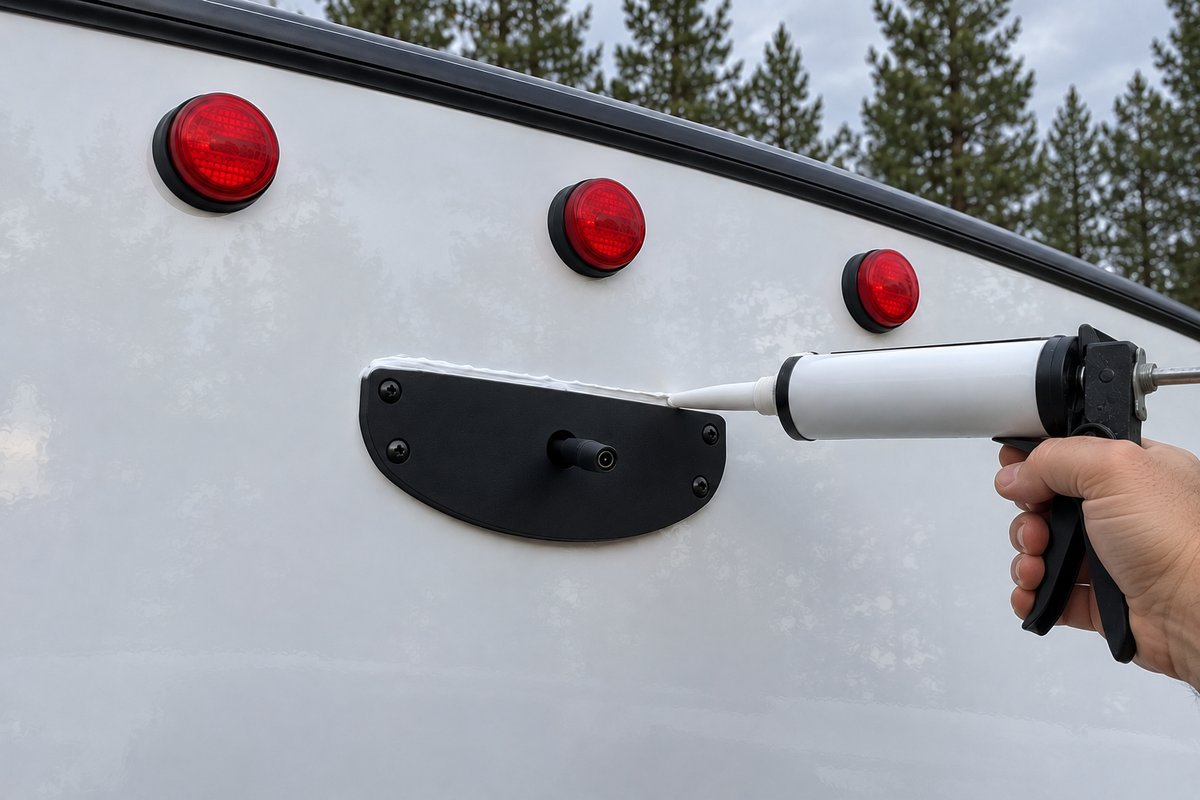
Without factory prewiring, the order Lippert lays out is sensible. Mount the monitor in the truck first, somewhere it doesn't block your view. Pair the monitor and camera on the bench using the plug-in power cable from the kit, so you know they communicate before you drill anything. Then disconnect the trailer's 12 volt power before you touch any wiring.
Mount the camera as high as you can on the back wall, as Lippert recommends and where the marker lights already are. Know what's behind the wall before you drill the hole for the power lead. Connect the lead to the nearest 12 volt supply as the kit instructions say, including the fuse they call for. Then seal around the bracket and every screw hole with RV sealant, so rain doesn't follow the screws into the wall.
This is ordinary 12-volt work, much closer to replacing a marker light than to anything on the truck's wiring. If the camera is going up high on a tall fifth wheel and you're not comfortable on a ladder, it's a fair job to hand to a shop. Ask for the quote in hours as well as dollars, since a pre-wired trailer and a bare one are very different jobs.
Is an RV Backup Camera Required by Law?
Not for your trailer. The federal rear visibility standard, FMVSS 111, requires a rearview camera image on cars, trucks, and other vehicles with a gross vehicle weight rating of 10,000 pounds or less built on or after May 1, 2018. The standard lists the vehicle types it covers, and trailers aren't included. It also doesn't reach back to a tow vehicle built before that date.
The camera that rule put in your truck stops being much use once you hitch up. With a trailer on the ball, it shows you the coupler and the front wall of the trailer, which is handy for hooking up and not much else. Your view behind you on the road is governed by your state's vehicle code, mostly through its mirror rules, and those vary from state to state.
What's Causing Your Wireless RV Backup Camera to Drop Out?
Before you decide a camera is faulty, work through the simple causes in order. Most of them cost nothing to fix.
| What you see | What to check first |
|---|---|
| Blank screen or no signal on a sunny day | Whether the trailer's marker lights are on. On most pre-wired trailers the camera shares their power, so turn the truck's headlight switch to On, not Auto |
| Camera works with the lights on, but flickers or cuts out | Your truck's power management. Furrion sells a 7-way adapter (F2BC004XXBK) for trucks that restrict the 12 volt supply |
| Picture fine in camp, breaks up at highway speed | Range while moving. Furrion's own figures drop from 492 feet in open space to 100 feet at high speed |
| Picture shows up late on a phone app | Whether it's a Wi-Fi camera. Lippert notes these can lag by up to one second |
| No picture after a new install or a reset | The pairing. Re-pair the monitor and camera following the kit's manual |
How Do You Reduce RV Backup Camera Interference?
Start with power, because a camera that isn't getting steady 12 volts looks exactly like a camera with a bad signal. Confirm the marker lights are lit at the top corners of the trailer, then watch whether the picture holds. If it works with the lights on and fails with them off, the camera wasn't the problem.
Next, re-pair. On the Vision S, Lippert's guide has you choose Pairing from the monitor's menu, pick the camera, and hold the button on the camera for two seconds. Other kits use a similar routine, and the manual will have it.
If the picture is clean at the campsite and only breaks up on the highway on a long RV, the camera is at the edge of its moving range. Furrion's 100-foot figure at speed is the realistic number to compare against. A kit that publishes only an open-space figure may fall short, and nothing on the box tells you by how much.
Frequently Asked Questions
Can I add a backup camera to an RV that didn't come with one?
Yes. A wireless system needs 12 volt power at the back of the RV, usually from the marker light circuit, and a spot on the dash for the monitor. The installation section above walks through the order Lippert recommends. The Furrion side cameras are the exception here, since they only pair with an existing Furrion Vision S monitor.
How far away can the monitor be from the camera?
It depends on the kit and on whether you're moving. Yakry rates the Y28 at 320 feet on vehicles. AUTO-VOX rates its rear and side kit as tested to 500 feet. Furrion's Vision S+ figures are 100 feet at high speed and 492 feet in open space. A camera at the back of a 40-foot RV is within all of those, but the trailer body and the truck cab still cut into the signal.
Will a backup camera drain my RV battery?
Not on a typical pre-wired setup. When the camera is fed from the marker light circuit, it only has power while the truck is plugged in and its lights are on. Once you unhitch, it goes dark. That's also why a pre-wired backup camera isn't a security camera for an empty campsite.
Quick Answers
Should you buy a wired or wireless RV backup camera?
For most travel trailers, wireless. The trailer and truck separate every time you camp, so a wired camera's cable has to come apart at the hitch on every trip. Wired is worth it when the picture has to be right every time, and you're willing to run the cable.
Why is my RV backup camera not working in daylight?
On most pre-wired trailers, the camera mount gets its power from the marker light circuit. Those lights only come on when the truck's parking lights or headlights are on, so turn the headlight switch to On rather than Auto before you pull out.
Do Wi-Fi backup cameras lag?
Lippert notes that Wi-Fi cameras that stream to a phone app can lag up to one second between what the lens sees and what the screen shows. A digital system with its own dedicated link is the better choice for watching traffic at highway speed.
Can you add a backup camera to an RV that didn't come with one?
Yes. Mount the monitor, pair it with the camera on the bench, disconnect the trailer's 12 volt power, then mount the camera high on the back wall and seal around the bracket and every screw hole with RV sealant.
How far away can the monitor be from the camera?
It depends on the kit and on whether you're moving. Yakry rates the Y28 at 320 feet on vehicles, and Furrion's Vision S+ figures are 100 feet at high speed and 492 feet in open space.
Is an RV backup camera required by law?
Not for your trailer. FMVSS 111 requires a rearview camera image on vehicles with a GVWR of 10,000 pounds or less built on or after May 1, 2018, and trailers aren't among the vehicle types the standard covers.
Where to go next
A camera fixes what you can see. The rest of a safe tow is the hitch, the tires, and the brakes, and the RV towing guide walks through all of it. If the camera trouble turned out to be the 7-way plug itself, the brake controller wiring harness guide explains what each wire in that plug does. If you want the camera to watch the trailer while you're away, an RV security camera built for an unattended RV handles that job. And once you're backed in, RV leveling blocks are the next thing to sort out.